launch-film is published by Emin Budak from EminBudak/launch-film, pinned to 940979bf3d82be136c4529a0b08aee7198ef178f. Review the source before installing.
A 20 to 40 second launch film made from a product's own website or App Store page: its real logo, colors, fonts and screens, set in motion with music and sound effects.
npx launch-film@latest linear.app
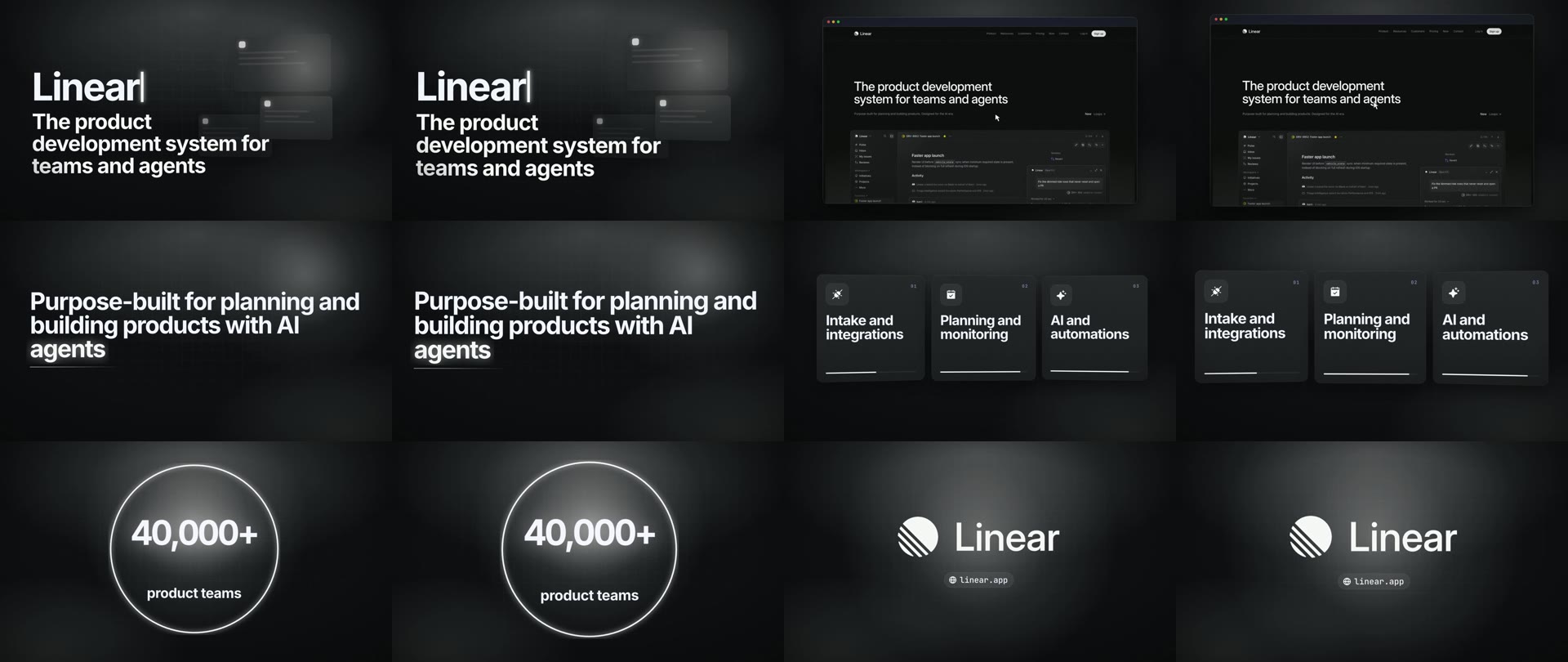
Watch the film (28 seconds). It was made with the command above and nothing else: no brief, no edits.
Tools that make videos with code usually start from a brief: you describe the product, its colors and the style you want. launch-film starts from the site. easybrandkit reads the logo, colors, fonts and first screen in a headless browser, the page's own headline and section titles become the film's words, and a look is picked to suit the brand. You get an MP4 at 1920x1080, rendered on your machine with Chrome and ffmpeg. There is no account, no API key and nothing is uploaded.
Read the story behind it on my blog: launch-film: A Launch Film From Your Website.
Use it with your agent
launch-film ships as an Agent Skill. Your agent gets the brand, picks a look, writes the scenes from the page's words, renders the film, checks it and hands you the MP4, with the launch pictures if you ask for them.
npx skills add EminBudak/launch-film
That covers Claude Code, Codex, Cursor and the other agents the skills CLI supports. To install it by hand instead:
Claude Code, as a plugin:
/plugin marketplace add EminBudak/launch-film
/plugin install launch-film@launch-film
or as a skill folder:
git clone https://github.com/EminBudak/launch-film
cp -r launch-film/skills/launch-film ~/.claude/skills/
Codex:
cp -r launch-film/skills/launch-film ~/.agents/skills/
Cursor:
cp -r launch-film/skills/launch-film ~/.cursor/skills/
In GitHub Copilot CLI, install it from the repo:
copilot plugin install EminBudak/launch-film
Then ask as usual:
Make a launch video for linear.app
Use it from the command line
npx launch-film <url> [options]          read the brand, plan the film, render it
npx launch-film plan <url> [options]     read the brand and write film.json only
npx launch-film render <film.json>       render a film.json after editing it
npx launch-film frames <film.mp4>        save stills of each clip and a contact sheet
npx launch-film check <film.mp4>         measure a render and write pass or fail
npx launch-film stills <url|film.json>   launch pictures at store and site sizes
npx launch-film looks | types | icons <word> | doctor

  --out <dir>           folder for the brand, film.json and the film (default ./launch-film-<site>)
  --look <name>         launch, aurora, gridline, pop or journal (default: picked from the brand)
  --seconds <n>         aim for 20 to 40 seconds (default 30)
  --aspect 9:16         a vertical film (default 16:9)
  --brand <dir>         use an easybrandkit folder you already have
  --easybrandkit <cmd>  the easybrandkit to run (default: LAUNCH_FILM_EASYBRANDKIT, one on PATH, else easybrandkit with npx)
  --no-music, --no-sfx, --jobs <n>, --keep
A run leaves this behind:
launch-film-linear.app/
  brand/              easybrandkit's kit: logos, colors, fonts, first screen
  words.json          the words read from the page
  film.json           the plan, which you can edit and render again
  film.mp4            the film
  frames/sheet.jpg    two stills from every clip, for checking
  check/CHECK.md      what launch-film check measured, when you run it
  stills/             the launch pictures, when you run launch-film stills
Launch stills
npx launch-film@latest stills linear.app --for ph,og,x,play,chrome
stills makes the pictures a launch needs, at the exact size each place asks for, from the film's look, the brand's logo and the site's real screen. Give it a site and it plans the film first, or give it a film.json you already have, so the pictures match the film you edited.
| file | size | for |
|---|---|---|
ph-1.png |
1270x760 | Product Hunt gallery: the logo, the promise and the site's screen |
ph-2.png to ph-6.png |
1270x760 | Product Hunt gallery: the film's own scenes, from the headline to the logo close |
ph-thumbnail.png |
240x240 | Product Hunt thumbnail: the app icon, or the logo |
og.png |
1200x630 | og:image, the picture a shared link shows |
x.png |
1600x900 | a post on X |
play-feature.png |
1024x500 | the Google Play feature graphic |
chrome-small.png |
440x280 | the Chrome Web Store small promo tile: the logo alone |
chrome-marquee.png |
1400x560 | the Chrome Web Store marquee tile: the logo and the screen, no text |
Every picture is an opaque PNG, since Google Play refuses transparency. stills/STILLS.md lists them with what each one is for. Leave out --for to get all of them.
Check a render
npx launch-film@latest check film.mp4 --expect 1920x1080@30 --seconds 30 --lufs -14 --cues cues.json
An agent can't watch a film or listen to it. check measures it with ffmpeg's own filters and writes down what it found:
CHECK.md: PASS or FAIL, a table of the checks, the stretches it found and every cut.check.json: the same, for a program.sheet.png: a frame from each shot, numbered, with its cut's time and whether it lands on the beat.wave.png: the sound's outline and loudness over time, with the cuts, beats, bars and hits marked.
| check | passes when |
|---|---|
| size and frame rate | they match --expect |
| length | it is within half a second of --seconds, or inside a range like 28-32 |
| black, still picture, silence | there is no long stretch of one inside the film |
| loudness | the integrated loudness is within 1 LU of --lufs |
| true peak | it is -1 dBTP or lower (up to 0 is a warning) |
| clipping | the sound never reaches full scale or sits flat on its peak |
| cuts on beats | every cut is within one frame of a beat in --cues |
Holds are often meant, so they don't raise alarms: up to 1 s of black at the start and 2 s at the end, an end card that stands still for up to 6 s, and a still picture shorter than 2 s inside the film all pass. A longer stretch is a warning, not a failure, unless most of the film is black or silent. Give the stretches you meant with --allow 27-30 and they count as meant. check exits with 1 when the film fails, so a script can stop on it.
The cuts come from the timeline launch-film writes next to its film. For a film made elsewhere, give them with --cuts 3.2,7.5 or a JSON file. Without either, check finds the hard cuts in the picture, and lists soft changes (a crossfade, or something starting to move) without judging them.
cues.json
--cues reads a track's beats as frame numbers. A tool that fits music to a cut can write it, or you can write it by hand:
{ "fps": 30, "beats": [0, 15, 30, 45], "bars": [0, 60, 120], "hits": [825], "frames": 960, "bpm": 120 }
fpsandbeatsare needed. Every number is a whole frame atfps, and frame 0 is the film's first frame.bars(each bar's first beat),hits(accents an edit should land on, like the drop),frames(the track's length) andbpmare optional.- Other keys are ignored, so a tool can add its own.
How it works
- Brand. easybrandkit opens the site in headless Chrome and saves its logos cut on their own background, its button, heading and surface colors, its font families and its first screen at 2x. Given an App Store or Google Play listing, it saves the app's icon, screenshots and rating, and reads the site the listing names.
- Words. The page's title, description, headline and section titles are read, with the line under each section title. Every word in the film comes from there.
- Plan. A first film is planned without a brief: the name and its promise, the real screen in a browser window, the page's own sentence as a headline, three sections as feature cards, a number the page states (or an app's store rating), the app's store screenshots, and the logo close with the site's address. It is written to
film.json. - Render. Each clip is an HTML page with one paused timeline. A virtual clock steps it frame by frame in headless Chrome, so every frame is drawn for its time however long drawing takes, and the frames go to ffmpeg. Two clips render at a time.
- Sound. The music and every sound effect are synthesised in code for this film: the groove starts on the second clip, each clip lasts whole bars so cuts land on the beat, and the logo lands on a hit. There are no samples.
- Check. Stills from each clip and a contact sheet are saved, so you (or your agent) can look before sharing.
launch-film checkmeasures the film as well: its size, length, black or still stretches, silence, loudness, peaks, and whether the cuts land on the beat.
film.json
{
  "brand": "brand/brand.json",
  "look": "launch",
  "aspect": "16:9",
  "clips": [
    { "kind": "scene", "bars": 2, "scene": { "type": "opener", "title": "Linear", "text": "The product development system for teams and agents" } },
    { "kind": "screen", "bars": 2, "image": "brand/screen-01.png", "mode": "pan" },
    { "kind": "scene", "bars": 2, "scene": { "type": "headline", "title": "Purpose-built for planning and building products with AI *agents*" } },
    { "kind": "scene", "bars": 2, "scene": { "type": "number", "value": "40,000+", "text": "product teams" } },
    { "kind": "logo", "bars": 2, "logo": "brand/logo-01.png", "site": "linear.app" }
  ]
}
| kind | what it shows |
|---|---|
scene |
type in motion; 37 types such as opener, headline, features, number, rating, steps, quote, compare, chat (list them with launch-film types) |
screen |
a screenshot in a browser window coming in from depth; mode: "zoom" with a box moves the camera onto one part of it |
shots |
two or three store screenshots side by side, coming in from depth |
phone |
a phone's screen capture in a drawn phone |
scroll |
a tall page scrolling in a window |
logo |
the logo close, from an easybrandkit logo file or an app icon |
Words between asterisks are set in the brand's accent color. A bar is one bar of the look's music, about two seconds; give seconds instead if you prefer.
Looks
| look | suits | |
|---|---|---|
launch |
a near-black stage with depth and soft light, type rising out of masks, one bright accent | developer tools, SaaS, dark sites |
aurora |
frosted glass cards over a slow aurora of the brand's colors | AI products, consumer apps, vivid brands |
gridline |
a light paper page with hairline columns and giant numerals, one signal color | B2B, finance, light sites |
pop |
full color fields that change with the cuts, sticker cards with hard shadows | consumer apps, food, games, social |
journal |
warm paper, newspaper rules, large serif headlines | editorial brands, publications |
Requirements
- Node 22 or newer
- Google Chrome or Chromium (set
LAUNCH_FILM_CHROMEto use another build) - ffmpeg (set
LAUNCH_FILM_FFMPEGandLAUNCH_FILM_FFPROBEto use another build) - easybrandkit: install it with
npm install -g easybrandkit, or launch-film runs it withnpx -y easybrandkit@latest(setLAUNCH_FILM_EASYBRANDKITto use a copy of your own)
Run npx launch-film@latest doctor to check. It has been tested on macOS with Chrome 156 and ffmpeg 7.1, and on Linux with Chrome 155 and ffmpeg 8.0.
Limits
- The film says what the site says. A page with few section titles gives a thin first plan; edit
film.jsonor let your agent write the scenes. - A brand typeface that Google Fonts does not have is replaced by the look's own, and the render says which.
- easybrandkit needs a site that opens in a headless browser. A bot check or a login wall gets no kit, and a social profile is not a brand's site.
- A 30 second film takes one to three minutes to render on a laptop.
- The music is simple by design. To use your own track:
ffmpeg -i film.mp4 -i track.mp3 -map 0:v -map 1:a -c:v copy -shortest out.mp4.
License
MIT. The icons are Phosphor Icons (MIT); see THIRD_PARTY.md for them and for the fonts fetched at render time.